



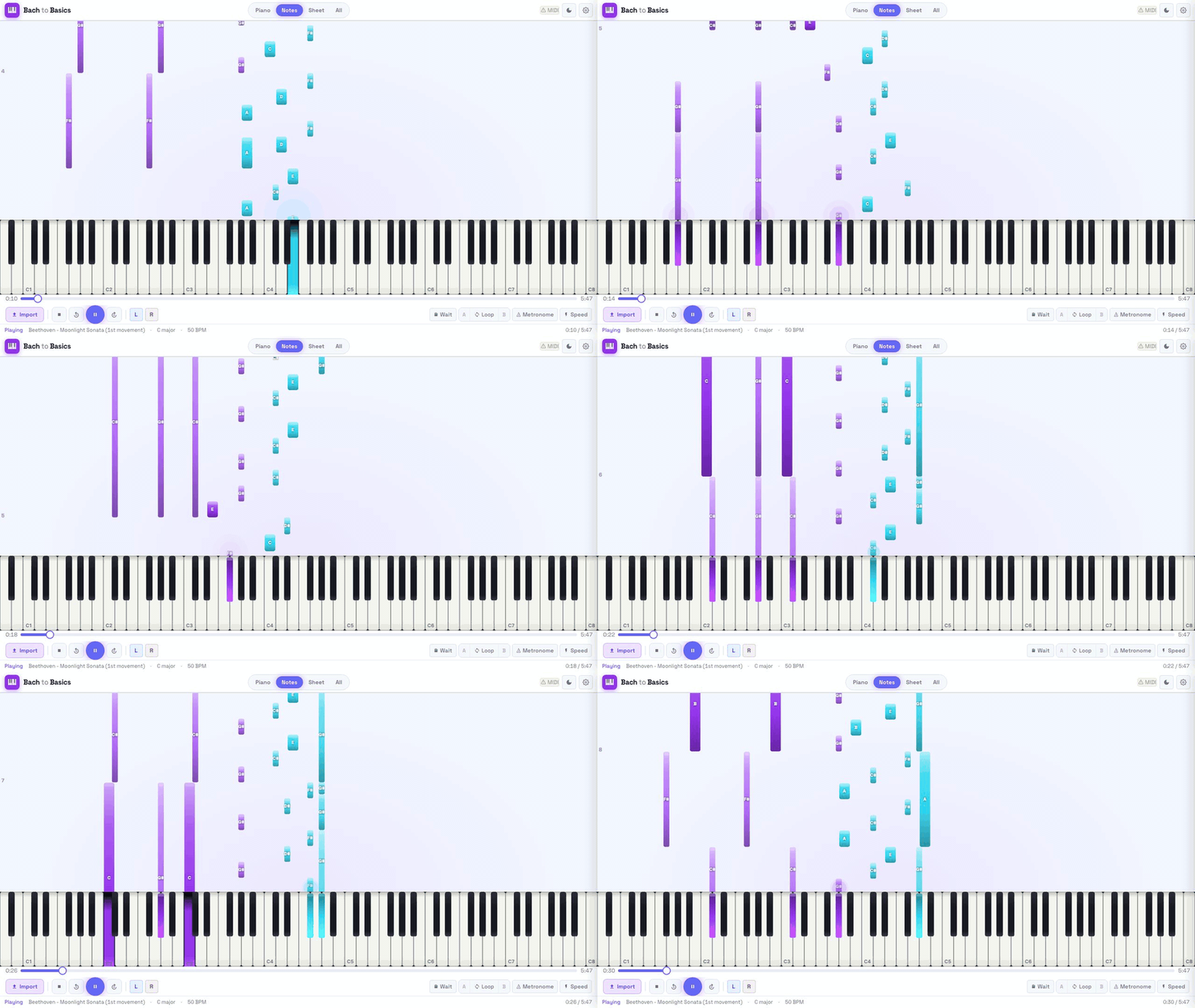
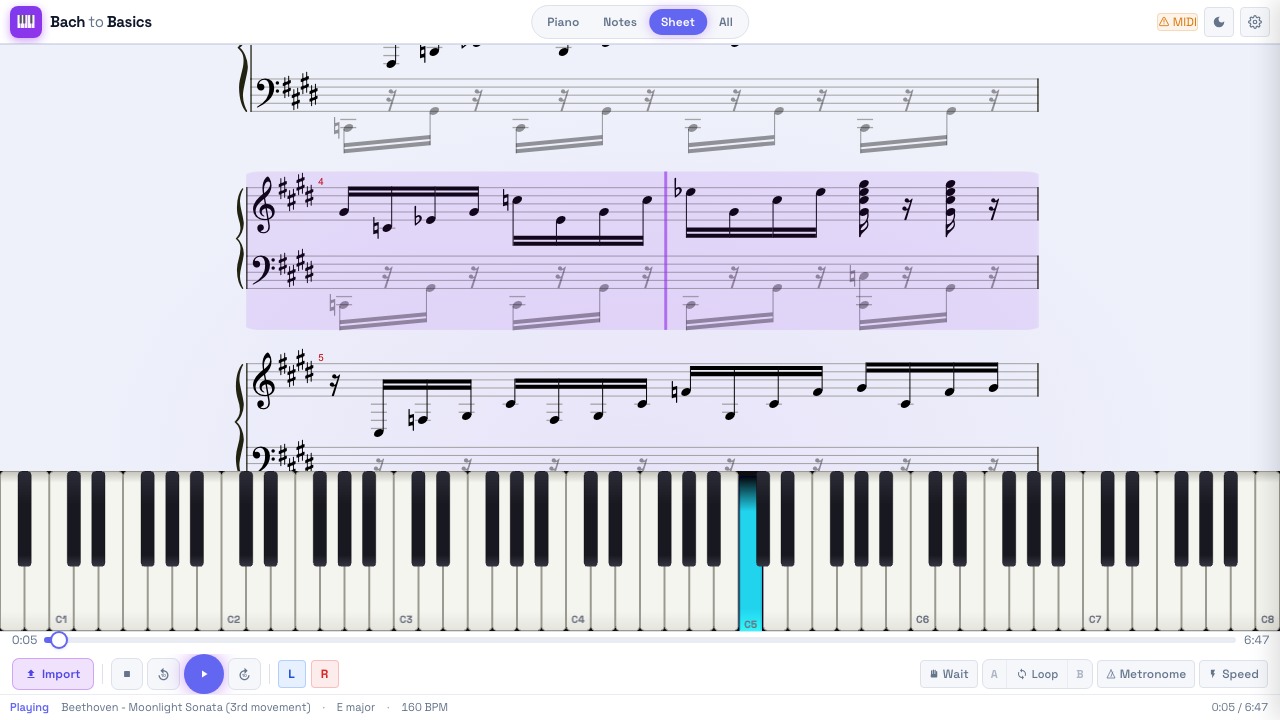
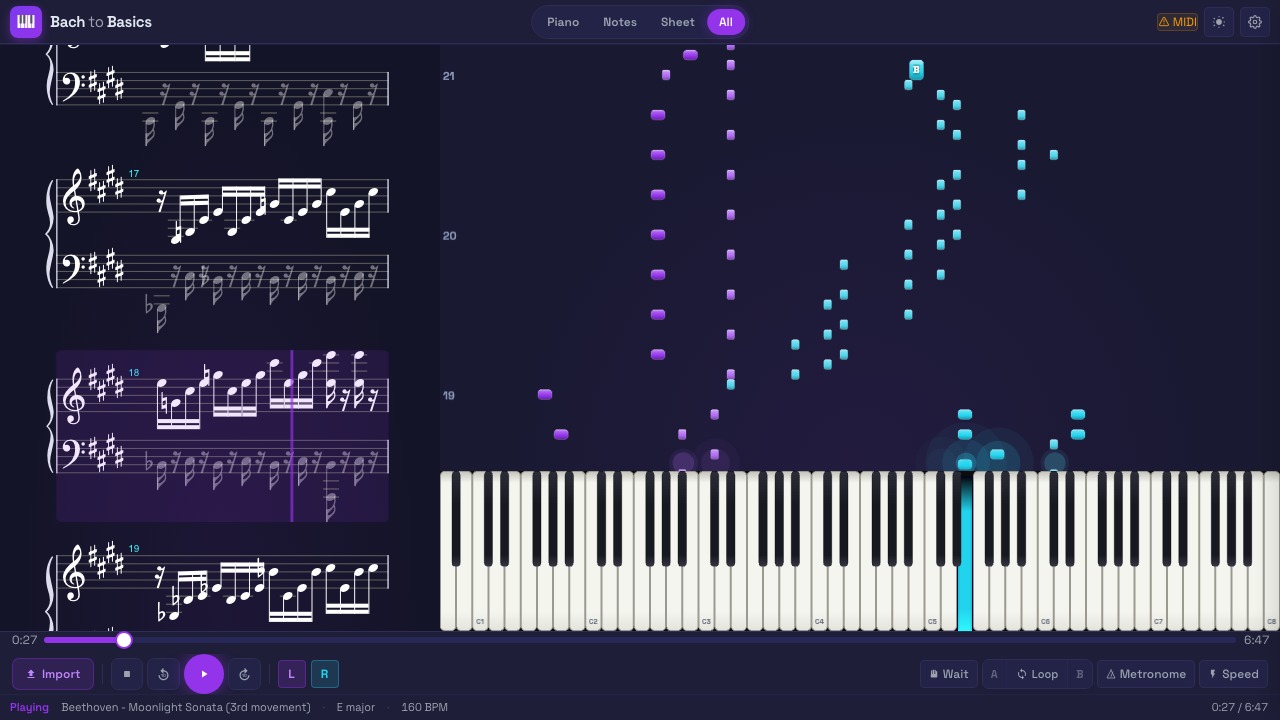
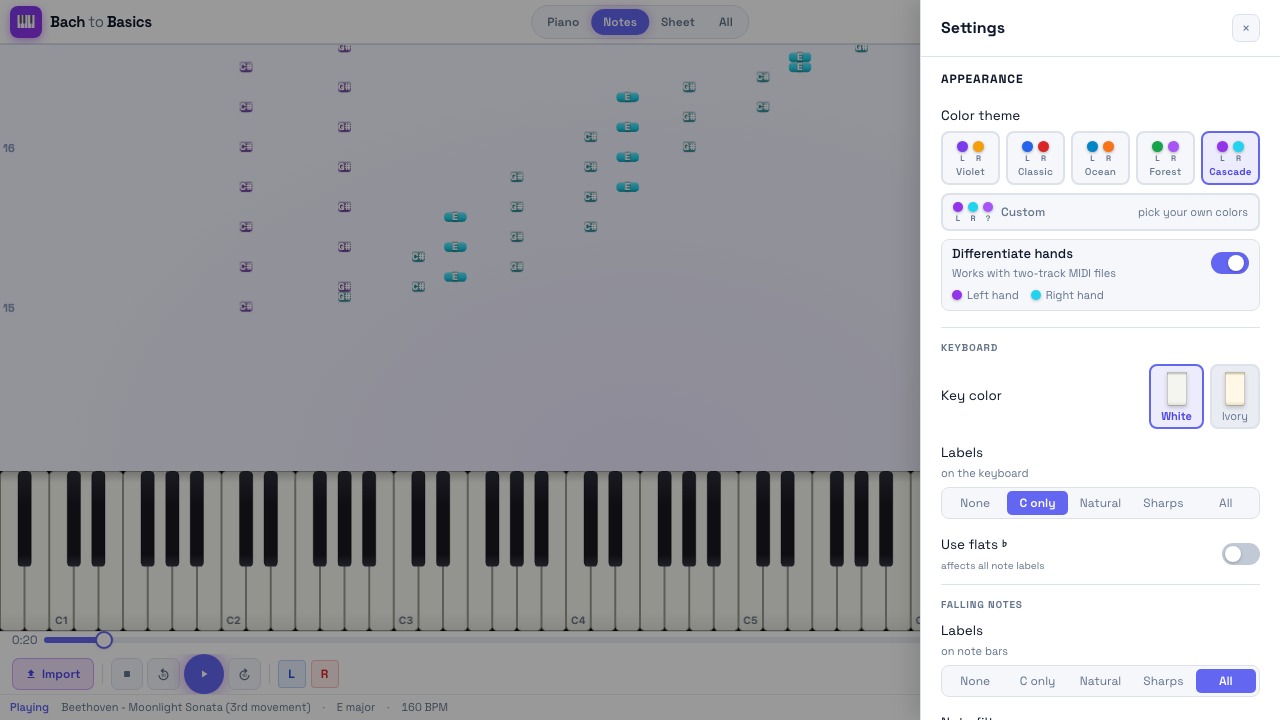
A browser-based piano practice tool. Drop in a MIDI file, a MusicXML score, or even a PDF of sheet music. Bach to Basics turns it into synced views of falling notes, an interactive 88-key piano, and rendered sheet music, then layers on practice tools (A/B loop, speed trainer, wait mode, metronome, transpose) to help you learn the piece.
| Sheet music | All views | Settings |
|---|---|---|
 |
 |
 |
Features
Import
- MIDI (
.mid,.midi): parsed in a Web Worker, converted to MusicXML on the backend for sheet rendering - MusicXML (
.xml,.mxl): both uncompressed and compressed (zip-style) variants - PDF sheet music (
.pdf): optical music recognition via Audiveris to MusicXML, then to MIDI (optional setup, see below) - Audio recordings (
.mp3,.wav,.m4a,.ogg,.flac,.aac): audio-to-MIDI transcription via Basic Pitch (optional setup, see below) - drop a recording of yourself improvising, get a playable piano roll
Drag-and-drop anywhere on the window, or use the import button.
⚠️ A note on import accuracy. PDF-to-MIDI (optical music recognition), MIDI-to-sheet-music (notation reconstruction), and audio-to-MIDI (pitch detection) are all inherently lossy conversions. Expect some inconsistencies:
- PDF imports can mis-read notes, dynamics, ornaments, articulation, and voicing, especially with low-resolution scans, handwritten scores, or complex layouts. Audiveris is the best open-source OMR engine available, but no engine matches a careful human transcription.
- MIDI imports produce sheet music by re-deriving notation from raw note timings. MIDI doesn't encode key signatures, beaming, voicing, articulation, or enharmonic spelling, so the rendered sheet is an interpretation, not a faithful reproduction of the composer's original score.
- Audio imports detect pitches in the mixed signal - this is pitch-detection, not source separation. Quality is excellent on solo instruments (piano, voice, guitar) and degrades on complex mixes (full-band recordings with drums + bass + vocals). For multi-track sources, expect a rough sketch rather than a clean transcription. Solo piano recordings give the best results.
For the cleanest sheet-music experience, import a MusicXML file (or
.mxl) when you have one, which preserves full notation semantics end-to-end.
Visualization
- Falling notes: Synthesia-style, GPU-accelerated via PixiJS. Hand-color separation, octave grid, measure numbers, optional beat lines, sustain-pedal indicators, ghost-notes-while-pedal-held, configurable impact effects (bloom / side burst / particle trail / off), and a "note outline" mode for high-contrast viewing.
- Sheet music: full notation rendering via AlphaTab, with auto-scrolling cursor that tracks playback. White background toggle so notation stays readable in dark mode.
- 88-key piano: interactive keyboard with hover, press depth, ivory or white key themes. Tap keys to play; drag across them to glissando.
Practice tools
- A/B loop with click-to-set markers; the loop region highlights across all three views
- Speed trainer: auto-ramps tempo on each loop pass (configurable start %, end %, step %)
- Wait mode: playback pauses until you play the correct note. Per-hand: wait for left only, right only, or both.
- Count-in: 0, 1, or 2 bars of metronome before the music starts
- Metronome: accent on downbeat
- Transposition: shift the whole score ±12 semitones
- Per-hand volume: solo or mute either hand independently
- Render-offset: shift audio scheduling ±200 ms to compensate for audio interface latency
- Fingering hints: 1-5 finger digits on the piano keys, optionally also on the falling-note bars. Auto-generates via the Parncutt algorithm (pianoplayer) for files without fingerings, and preserves editorial fingerings already present in publisher MusicXML /
.mxlfiles (Henle, Bärenreiter, etc.). "Regenerate" treats existing fingerings as anchors and only fills in gaps - ideal for editorial scores where only hard passages are annotated.
Audio & MIDI
- 5 instrument options: Splendid Grand Piano, Bright Acoustic, CP80 Electric, Harpsichord, Honky-Tonk (sampled, via smplr)
- MIDI input via Web MIDI: connect a hardware keyboard (Roland, Yamaha, etc.); your input lights up the on-screen keys and drives wait mode
- Tempo control: 25%-200% with snap-back to 100%
Export
Save the loaded piece in any of these formats via the Export button (next to Import):
- MIDI (
.midi) - the raw note data - MusicXML (
.musicxml) - full notation, opens in any score editor - PDF sheet music (
.pdf) - typeset via LilyPond (optional backend setup, see below) - MP3 audio (
.mp3) - rendered with the Splendid Grand Piano via an OfflineAudioContext (other instruments to follow; the grand covers the common case)
Look & feel
- Color themes: Cascade, Violet, Classic, Ocean, Forest, or fully custom (left/right/unknown hand colors)
- Dark / light mode: system-aware initial theme, manual override
- Note labels: none, C-only, white keys, black keys, or all
Tech stack
| Layer | Technology |
|---|---|
| Frontend | React 19, TypeScript, Vite, Tailwind CSS |
| Rendering | PixiJS 8 (falling notes + piano), AlphaTab (sheet music) |
| Audio | Tone.js (scheduling), smplr (sampled instruments), Web Audio API |
| MIDI input | WebMidi.js |
| State | Zustand |
| Backend | FastAPI (Python 3.11/3.12) |
| Music processing | music21, defusedxml |
| OMR (optional) | Audiveris (Java) |
Running the app
Option A: Docker (recommended for end users)
The simplest way. Requires only Docker Desktop (or Docker Engine + Compose).
docker compose up        # build the images on first run, then start
open http://localhost:5173
That's it. Stop with Ctrl+C (or docker compose down).
Optional: copy
.env.exampleto.envand setBACKEND_API_KEYif you want to require an API key on the backend.
Option B: Native (recommended for development)
You'll need:
- Node.js 22+ and pnpm (
npm i -g pnpm) - Python 3.11 or 3.12
- Java 17+, only needed for PDF import via Audiveris
pnpm install
pnpm backend:setup      # creates backend/.venv with the core deps
pnpm dev                # frontend on :5173, backend on :8000, with hot reload
Optional: PDF import via Audiveris
PDF to MusicXML uses Audiveris, an open-source OMR engine.
- Download
audiveris.jarfrom Audiveris releases - Place it at
backend/bin/audiveris.jar - Make sure Java 17+ is on
PATH(Docker users: already included in the image)
Without the JAR, MIDI / MusicXML import still works, only PDF import is unavailable.
Optional: PDF export via LilyPond
PDF export uses LilyPond for typesetting. It's not bundled by default (heavy install, ~200 MB).
- macOS:
brew install lilypond - Linux:
sudo apt install lilypond - Docker: add
lilypondtobackend/Dockerfile'sapt-get installline, thendocker compose build backend
Restart the backend after installing. Without LilyPond, MIDI and MusicXML export still work; only PDF export is unavailable.
Optional: Audio-to-MIDI via Basic Pitch
Audio-to-MIDI transcription uses Basic Pitch, Spotify's open-source pitch-detection model. It's not bundled by default because it pulls in TensorFlow (~500 MB) and has tight Python-version constraints.
- macOS: requires Python 3.11 specifically.
brew install python@3.11, then create a 3.11 venv atbackend/.venvandpip install -r backend/requirements-transcribe.txt. (Python 3.12+ doesn't work on macOS becausebasic-pitchrequirestensorflow-macos<2.15.1, and no compatible wheel exists for 3.12.) - Linux: Python 3.11 or 3.12. Activate the venv and
pip install -r backend/requirements-transcribe.txt. - Docker: edit
backend/Dockerfileto alsopip install -r requirements-transcribe.txt(or use a separate build target), thendocker compose build backend. The image already uses Python 3.12.
Restart the backend after installing. Without Basic Pitch, MIDI / MusicXML / PDF import still works; only audio import (MP3, WAV, etc.) is unavailable.
Using the app on iPad / iPhone (same network)
- In
frontend/vite.config.ts, addhost: trueto theserverblock (or runpnpm --filter frontend dev --host) - Find your computer's LAN IP (System Settings > Network on macOS)
- On the iPad, open
http://<your-ip>:5173
⚠️ Web MIDI is not available on iOS, the on-screen keyboard works, but you cannot connect a hardware piano via USB or Bluetooth from iOS Safari. This is a WebKit limitation Apple has not addressed.
Public deployments
If you're hosting Bach to Basics on the public internet (not on localhost or behind a VPN), set these env vars on the backend before exposing it:
BACKEND_API_KEY- a long random value; clients must sendX-API-Key: <value>on every requestREQUIRE_AUTH=1- makes the backend refuse to start ifBACKEND_API_KEYis not set (turns a silent log warning into a fail-fast)ALLOWED_ORIGINS- your exact frontend hostname only (e.g.https://piano.example.com), not*- Run behind HTTPS (Web MIDI requires it anyway)
Without these, the backend's expensive endpoints (audio transcription, PDF rendering, OMR, YouTube extraction) are open to the internet and can be abused.
Configuration
All backend settings come from environment variables. Copy .env.example to .env and edit.
| Variable | Default | Description |
|---|---|---|
ALLOWED_ORIGINS |
http://localhost:5173 |
Comma-separated list of allowed CORS origins |
BACKEND_API_KEY |
(unset = open) | When set, all requests must include X-API-Key: <value> |
REQUIRE_AUTH |
(unset) | Set to 1 to make the server refuse to start if BACKEND_API_KEY is not configured - useful for preventing accidental open deployments |
RATE_LIMIT_PER_MIN |
60 |
Max requests per IP per minute. 0 disables it |
HEAVY_RATE_LIMIT_PER_MIN |
10 |
Stricter limit applied to expensive endpoints (/omr/, /youtube/) |
TRUSTED_PROXY_IPS |
(unset) | Comma-separated IPs of trusted reverse proxies. When set, the real client IP is read from X-Forwarded-For instead of the connection address |
MUSIC21_TIMEOUT_S |
60 |
Hard timeout (seconds) for music21 conversions (MIDI-to-MusicXML, MusicXML-to-MIDI). Raise for very dense scores |
AUDIVERIS_TIMEOUT_S |
120 |
Hard timeout (seconds) for Audiveris OMR. Raise for large or multi-page PDFs |
Web MIDI requires HTTPS in production. Plain
http://only works onlocalhost.
Project layout
bach-to-basics/
├── frontend/                     # React app (Vite)
│   ├── src/
│   │   ├── components/
│   │   │   ├── FallingNotes/     # PixiJS falling-note renderer
│   │   │   ├── PianoKeyboard/    # PixiJS 88-key keyboard
│   │   │   ├── SheetMusic/       # AlphaTab sheet music view
│   │   │   └── Transport/        # Transport bar + settings panel
│   │   ├── engine/               # SyncEngine, AudioEngine, MidiClock
│   │   ├── store/                # Zustand app state
│   │   ├── utils/                # Shared utilities
│   │   ├── views/                # PracticeView (main layout)
│   │   └── workers/              # MIDI parsing in a Web Worker
│   └── public/                   # Static assets (soundfont)
├── backend/                      # FastAPI backend
│   ├── routers/                  # transcribe, omr, youtube, export, fingering
│   └── services/                 # blocking work (music21, Audiveris, etc.)
├── shared/                       # TypeScript types shared with the frontend
├── docker-compose.yml            # 1-command run for end users
└── package.json                  # pnpm workspace root
Browser support
Requires a Chromium-based browser (Chrome, Edge, Brave, Arc) for Web MIDI API support. Firefox and Safari don't implement Web MIDI; on those, the on-screen keyboard still works but hardware MIDI input does not.
Roadmap
The backend already exposes endpoints for several features that don't yet have UI hooks:
- YouTube-to-MIDI via yt-dlp + Basic Pitch (
/youtube/extract), sync data model already in place
These will become user-facing in upcoming releases. PRs welcome.
Troubleshooting
Sheet music doesn't render after loading a MIDI file
The MIDI-to-MusicXML conversion runs on the backend. Check that the backend is up (curl http://localhost:8000/health should return OK) and look at the backend terminal for music21 errors. Very dense scores can hit the MUSIC21_TIMEOUT_S (default 60s); raise it if needed.
No sound from the on-screen piano
The first interaction (any click) wakes the audio context. If you still hear nothing, open DevTools > Console and look for errors related to AudioContext or sample fetches from smpldsnds.github.io / gleitz.github.io. Some corporate networks block these CDNs.
"WebMIDI not supported" on Firefox or Safari
Use Chrome, Edge, Brave, or Arc. Firefox and Safari haven't implemented Web MIDI.
PDF import says "OMR engine not available"
Either Audiveris isn't installed, or audiveris.jar isn't at backend/bin/audiveris.jar, or Java 17+ isn't on the PATH. See the PDF import section above. MIDI and MusicXML import are unaffected.
Docker build fails on the frontend
The frontend Dockerfile uses the repo root as build context to read pnpm-workspace.yaml and shared/. If you've moved or renamed those, update docker-compose.yml's build.context accordingly.
Contributing
See CONTRIBUTING.md. Bug reports and PRs welcome.
License
MIT for this codebase.
Third-party components (AlphaTab, music21, etc.) keep their own licenses, see NOTICE for the rundown. Notably:
- AlphaTab is MPL-2.0 (per-file copyleft), fine for both open source and commercial use as long as you don't modify AlphaTab's own files.
- Audiveris is AGPL-3.0 and is not bundled, users download it separately, so this repo doesn't inherit AGPL obligations.